
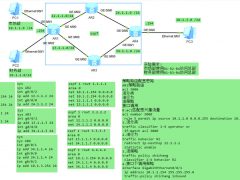
1.理解组网架构,网络拓扑ensp实现,交换机57,路由器2220.
2.vlan配置与ip地址配置,跨vlan通信
3.dhcp配置(全局和基于接口)
4.路由配置:静态,默认,RIP/OSPF
5.ACL配置,NAT配置,策略路由配置
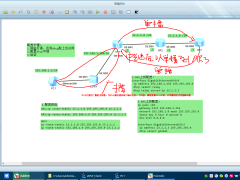
场景1:所有流量默认走电信,如果电信故障,流量切换到联通。
场景2:教学楼流量走电信出口,宿舍楼流量走联通出口。
场景3:访问电信的服务器走电信出口,访问联通的服务器走联通出口。

接入层交换机acsw配置如下:
<acsw>dis cu
#
sysname acsw
#
undo info-center enable
#
vlan batch 10 20
#
interface GigabitEthernet0/0/1
port link-type access
port default vlan 10
#
interface GigabitEthernet0/0/2
port link-type access
port default vlan 20
#
interface GigabitEthernet0/0/3
port link-type trunk
port trunk allow-pass vlan 10 20
核心交换机coresw配置如下:
<coresw>dis cu
#
sysname coresw
#
undo info-center enable
#
vlan batch 10 20 30
#
ip pool v10
gateway-list 192.168.10.254
network 192.168.10.0 mask 255.255.255.0
excluded-ip-address 192.168.10.2 192.168.10.253
lease day 8 hour 0 minute 0
dns-list 8.8.8.8
#
ip pool v20
gateway-list 192.168.20.254
network 192.168.20.0 mask 255.255.255.0
excluded-ip-address 192.168.20.10 192.168.20.253
lease day 6 hour 0 minute 0
dns-list 8.8.8.8
#
interface Vlanif10
ip address 192.168.10.254 255.255.255.0
dhcp select global
#
interface Vlanif20
ip address 192.168.20.254 255.255.255.0
dhcp select global
#
interface Vlanif30
ip address 192.168.30.254 255.255.255.0
#
interface GigabitEthernet0/0/1
port link-type access
port default vlan 30
#
interface GigabitEthernet0/0/3
port link-type trunk
port trunk allow-pass vlan 10 20
#
ospf 1
area 0.0.0.0
network 192.168.10.0 0.0.0.255
network 192.168.20.0 0.0.0.255
network 192.168.30.0 0.0.0.255
#
ip route-static 0.0.0.0 0.0.0.0 192.168.30.3
出口路由器AR1配置如下:
<AR1>dis cu
#
sysname AR1
#
undo info-center enable
#
bfd
#
acl number 2000
rule 10 permit source 192.168.10.0 0.0.0.255
rule 20 permit source 192.168.20.0 0.0.0.255
acl number 2010
rule 10 permit source 192.168.10.0 0.0.0.255
acl number 2020
rule 20 permit source 192.168.20.0 0.0.0.255
#
traffic classifier sushe operator or
if-match acl 2020
traffic classifier jiaoxue operator or
if-match acl 2010
#
traffic behavior re-liantong
redirect ip-nexthop 23.1.1.2
traffic behavior re-dianxin
redirect ip-nexthop 12.1.1.1
#
traffic policy p
classifier jiaoxue behavior re-dianxin
classifier sushe behavior re-liantong
#
interface GigabitEthernet0/0/0
ip address 12.1.1.3 255.255.255.0
nat outbound 2000
#
interface GigabitEthernet0/0/1
ip address 192.168.30.3 255.255.255.0
traffic-policy p inbound
#
interface GigabitEthernet0/0/2
ip address 23.1.1.3 255.255.255.0
nat outbound 2000
#
bfd dianxin bind peer-ip 12.1.1.1 source-ip 12.1.1.3 auto
commit
#
ospf 1
area 0.0.0.0
network 192.168.30.0 0.0.0.255
电信dianxin配置如下:
<dianxin>dis cu
#
sysname dianxin
#
bfd
#
interface GigabitEthernet0/0/0
ip address 12.1.1.1 255.255.255.0
#
interface GigabitEthernet0/0/1
ip address 100.1.1.1 255.255.255.0
#
interface LoopBack0
ip address 1.1.1.1 255.255.255.0
#
bfd dianxin bind peer-ip 12.1.1.3 source-ip 12.1.1.1 auto
commit
#
rip 1
version 2
network 1.0.0.0
network 100.0.0.0
network 12.0.0.0
联通liantong配置如下;
<liantong>dis cu
#
sysname liantong
#
undo info-center enable
#
interface GigabitEthernet0/0/1
ip address 100.1.1.2 255.255.255.0
#
interface GigabitEthernet0/0/2
ip address 23.1.1.2 255.255.255.0
#
interface LoopBack0
ip address 2.2.2.2 255.255.255.0
#
rip 1
version 2
network 2.0.0.0
network 100.0.0.0
network 23.0.0.0
实验验证
说明:本次的bfd检测在出口路由器上和电信上都做了配置。当然我们在实际项目时候可能无权限操作运营商的设备无法做配置,所以我们通常会用单臂回声去做bfd。
在这里重点了解策略路由配置步骤思路如下:
1.配置acl,匹配流量
acl number 2010
rule 10 permit source 192.168.10.0 0.0.0.255
acl number 2020
rule 20 permit source 192.168.20.0 0.0.0.255
2.流分类
traffic classifier sushe operator or
if-match acl 2020
traffic classifier jiaoxue operator or
if-match acl 2010
3.流行为
traffic behavior re-liantong
redirect ip-nexthop 23.1.1.2
traffic behavior re-dianxin
redirect ip-nexthop 12.1.1.1
4.流策略
traffic policy p
classifier jiaoxue behavior re-dianxin
classifier sushe behavior re-liantong
5.入口调用
interface GigabitEthernet0/0/1
ip address 192.168.30.3 255.255.255.0
traffic-policy p inbound
实验验证:

实现宿舍楼走联通

 eNSP报错40最全解决方案,保存!
 中型wlan部署有线和无线实验
 ospf的路由策略实验
 路由过滤与路由策略实验
 策略路由实验
 企业通过dhcp中继自动获取ip地址原理分析
 mpls部分php倒数第二跳抓包分析
 mpls vpn ldp动态lsp配置